
FinderPath
A Finder addition that displays a small address bar in Finder windows.
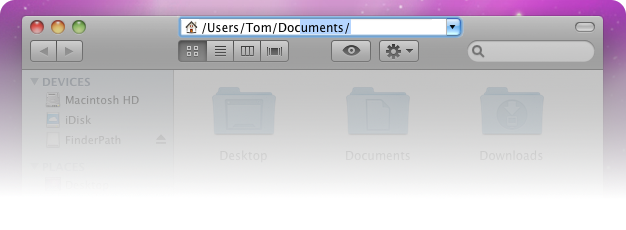
Features
- Easily copy/paste file paths.
- Easily access hidden files and folders.
- Fast filesystem navigation through path completion and suggestion popups.
- Search Mode: Enter filenames to search the current directory. Way more reliable than Finders "find as you type".
- Wildcard support: Type *.pdf to select all pdf files in the current folder.
- Open terminal in current directory by keypress.
- No Bloatware: Doesn't get in your way until you activate it, and stays in background if you don't.
- A word of warning: I explicitly tag this app Beta. Most stuff is working, but use it at your own risk and PLEASE REPORT BUGS!
Usage
Press Command+G or click on Finder's titlebar item to activate the FinderPath address bar.Shortcuts
| Tab/Return | Complete highlighted suggestion & open Path in Finder |
| Down Arrow | Display a list of completions |
| ⌘ + Return | Open file |
| ⌘ + Up | Go to parent folder |
| ⌘ + H | Go to Home folder |
| ⌘ + N | Open new Window |
| Escape | Leave address bar |
| ⌘ + R | Reload (also works when inactive) |
| ⌘ + T | Open in Terminal (also works when inactive) |
| ⇧⌘ + F | Enter Search Mode (also works when inactive) |
| ⇧⌘ + . | Show/Hide hidden files (restarts Finder, also works when inactive) |
Note: If you like FinderPath, make sure you also check out my other productivity apps:


Release Notes
FinderPath 0.9.5
March 23, 2015
- Improved compatibility with OS X Yosemite
FinderPath 0.9.4
April 30, 2010
- Search/Select files with wildcards (*.pdf ...)
- Improved memory footprint and performance in general
- The tab key now behaves pretty much like the enter key (completes & opens in Finder) (thanks to Alexandre Feblot)
- New shortcuts: shift + cmd + . - show/hide hidden files (Restarts finder)
- Some more shortcuts are forwarded to Finder (cmd+[1234] - view mode switching)
- Fix: don't hang when switching kotoeri key layouts (thanks to Shungo Watanabe)
- Fix: "open in Terminal" now really working (thanks to Louis Romero)
- Fixed a dozen bugs and annoyances in ShortcutRecorder
FinderPath 0.9.3
April 26, 2010
- New Shortcuts: Command+T (open in Terminal), Command+R (Reload) - even work when FinderPath is inactive!
- When entering relative paths, search in current directory (Search mode)
- Preference option to take path from selected file/directory (not current directory)
- File Icon is now embedded in address bar
- Preferences can now be accessed in address bar context menu
- Fix completion on addresses with trailing '/'-es / folders
- Fix: don't activate on Finder's auxiliary windows (Preferences...)
- Fix: Address bar didn't hide when completion list was visible
- Fix: ugly font rendering in address bar
- Fix permission problem when not running as admin
FinderPath 0.9.2
April 22, 2010
- Some new Shortcuts: Command+n, Command+w
- Improved completion performance in large directories
- Fix: Don't open new window when revealing a file that is not in the current folder
- Fix: Sometimes the address bar didn't show up on hotkey press
- Fix: Application logo didn't respond to clicks on transparent areas in Finder
- Fix: Address bar size didn't respect Finder's titlebar icon size
- Fix: Incorrect address bar location on second display
- Fix: Copy, cut & paste by keyboard works again
- Fix: Hide again when dragging window from finder's titlebar item
FinderPath 0.9.1
April 21, 2010
- You have to stop FinderPath from Activity Monitor to be able to replace FinderPath.app in /Applications. This is the last time you will have to do that, we are using Sparkle from now on.
- Sparkle updater integration
- Preference & About windows (right click on the file/directory icon to show menu, or double click FinderPath.app while running)
- New Default Hotkey: Command+G
- Fix: Activation did't work after finder restart
- Fix: Command+H now goes to the home folder instead of hiding FinderPath
- Fix: when typing a file path (not directory), reveal it instead of opening
- Fix: Make click region (Finder's titlebar item) a little wider
- Some minor fixes
FinderPath 0.9.0
April 19, 2010
This is the first Release of FinderPath. Expect some bugs and annoyances. Note that this is a early beta release after one day of coding. There is no gui/preference pane yet.
Use at your own risk!
Contact
For bugs, suggestions and feedback contact me at finderpath@bahoom.com.Copyright ©2015 Christian Baumgart